
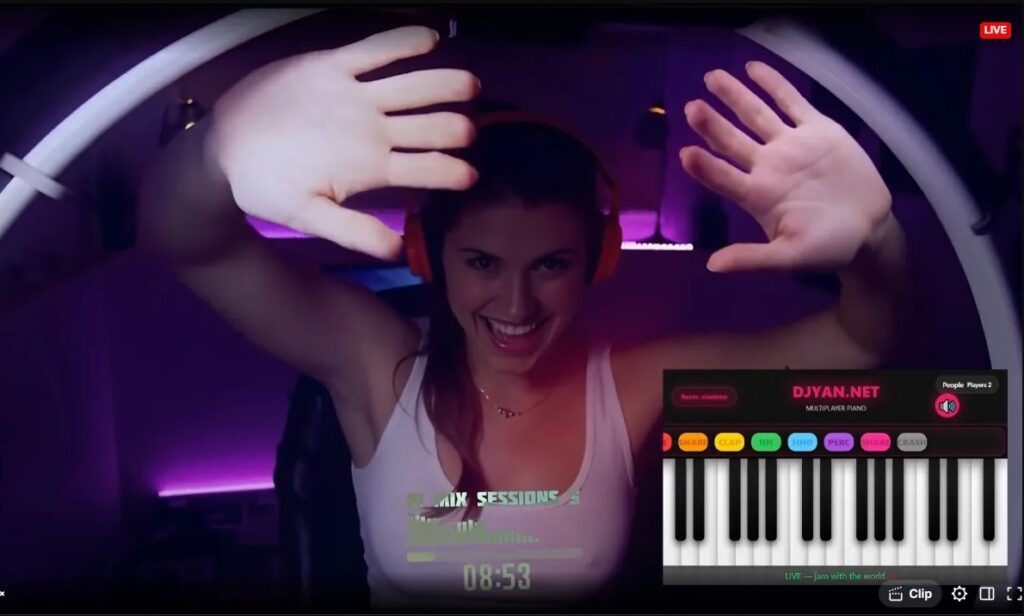
Play piano together online instantly. Perfect for live streams, OBS friendly, viewer interactions, and music fun.
Why Streamers Use It with OBS
- Add as Browser Source in OBS (zero lag, transparent background)
- Viewers join and play along live – keys light up in real time
- Crystal-clear audio + visual feedback on stream
- Lock the room for solo performances or open for chaos
- Added MIDI capability – you can already jam with your midi devices.
- Added 128 Sound Presets (General-Midi friendly)
- Added inverse piano color mode
- Added MIDI playing mode (Drums/Note Keys)
- Added MIDI velocity sensitivity
- Added Emojis for more interactive fun
Check out basic integration on your website or in OBS (Browser Source URL) : https://djyan.net – scroll down – the piano is under the streaming video.
Quick Room Setup with URL Parameters
Create or join rooms directly via URL for seamless sharing:
- Create a new room: Append ?room=ROOM_ID to the base URL (e.g., djyajn.net/multipiano?room=mynewroom) – generates a unique room ID instantly.
- Join an existing room: Use ?room=ROOM_ID (e.g., djyan.net/multipiano?room=abc123) – jumps straight in. Share these links with viewers for one-click joins during streams.
All URL Parameters – Quick Guide
Add any of these to the piano URL for instant customization:
?room=yourname
Create or join a private room (max 20 characters, letters/numbers/-/_ only)
Example:?room=jazzclub?obs
Streamer/OBS mode – Pure black background, hides everything except piano keys + falling notes (perfect transparent overlay)
Example:?obsor?obs&room=vip?invisible
Hides player names in falling notes + lighter visuals (great for low CPU and clean streams)?light
Light theme – white piano keys, bright look?fps=30
Locks frame rate (10–60) – lower = less CPU usage
Example:?fps=30?noparticles
Completely removes falling notes (maximum performance)
Combine any parameters:
?obs&room=lobby→ Clean overlay + private room?obs&fps=30→ Ultra-smooth transparent overlay?obs&noparticles→ Pure black screen with only key presses?light&room=chill→ Bright theme + custom room
No reload needed – just change the URL and it works instantly!
That’s it – no extra setup needed!
How to Add to OBS (30 seconds)
- Open djyajn.net/multipiano
- Create or join a room ( ?room=ROOM_ID )
- Copy the room link
- OBS → Sources → + → Browser Source → paste URL
- Enable “Shutdown source when not visible” + transparency (optional)
No registration, no downloads, works on PC/Mac/Linux.
Start your interactive piano stream now → djyan.net/multipiano/?room=your_new_room_id
https://djyan.net/multipiano/?room=your_new_room_id
tROUbleshooting
In case you have heavy lagging because of the Multipiano addition to OBS via browser source you can fix the cpu overload by adding additional parameters to the url:
For zero lag try those (Copy/Paste the urls):
Recommended → https://djyan.net/multipiano/?room=room_id&invisible&fps=20
Super safe (old PCs) → https://djyan.net/multipiano/?room=room_id&invisible&fps=15
Still pretty + light → https://djyan.net/multipiano/?room=room_id&light&fps=30
Full beauty (direct play) → https://djyan.net/multipiano/?room=room_id
You may see this on first time you will try activating midi connection:
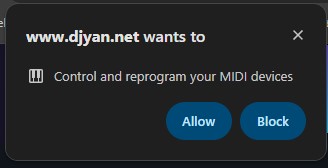
Select “Allow” to play with MIDI keyboard.
You can use/embed the piano into your website via iframe:
  <!-- DJYAN.NET Multiplayer Piano -->
<iframe
  src="https://djyan.net/multipiano/index.html?room=YourRoomID&fps=30"
  frameborder="0"
  allowfullscreen
  allow="autoplay; encrypted-media; midi *; clipboard-write"
  tabindex="0"
  id="djyan-piano-iframe"
  style="border:1px solid transparent; outline:none; display:block; width:100%; min-height:65vh; max-width:1400px; margin:0 auto; border-radius:12px; transition: all 0.3s ease;"
  title="DJYAN.NET Multiplayer Piano">
</iframe>

<!-- NOTE: This part is for autofocusing the window - not a must but if you want keyboard to work on page load - you have to add this -->

<style>
  .piano-focused {
    border: 1px solid #ffeeffaa !important;
    box-shadow: 0 0 20px 4px #e91e63, inset 0 0 13px rgba(233, 30, 99, 0.2) !important;
  }
</style>

<script>
(function() {
  const iframe = document.getElementById('djyan-piano-iframe');
  if (!iframe) return;

  let hasActivated = false;

  // Activate piano on first interaction
  function activatePiano() {
    if (hasActivated) return;
    hasActivated = true;

    iframe.contentWindow.focus();
    iframe.focus();

    // Trigger audio unlock
    iframe.contentWindow.postMessage({ type: 'unlockAudio' }, 'https://djyan.net');
  }

  // Add focus style
  function addFocusStyle() {
    iframe.classList.add('piano-focused');
  }

  // Remove focus style
  function removeFocusStyle() {
    iframe.classList.remove('piano-focused');
  }

  // Listen for focus/blur on iframe (fallback)
  iframe.addEventListener('focus', addFocusStyle);
  iframe.addEventListener('blur', removeFocusStyle);

  // Better: Listen for messages from inside the iframe when it gains/loses focus
  window.addEventListener('message', (event) => {
    if (event.origin !== 'https://djyan.net') return;

    if (event.data.type === 'iframeFocused') {
      addFocusStyle();
    } else if (event.data.type === 'iframeBlurred') {
      removeFocusStyle();
    }
  });

  // Activate on first interaction
  document.body.addEventListener('click', activatePiano, { once: true });
  document.body.addEventListener('touchstart', activatePiano, { once: true });
  document.addEventListener('keydown', activatePiano, { once: true });
})();
</script>
<br/>
If you have any questions message me on my socials i will try to help.